For AI Coding Tools
3forge Plugin
Turn the coding assistant your developers already trust into a 3forge expert, working on your live deployment under your institution's controls.
Function inside the fabric
Your coding assistant, fluent in 3forge
The 3forge Plugin equips Claude Code, Codex and GitHub Copilot to design, build and operate 3forge applications. It connects through the governed MCP server inside your deployment, so every action runs under the same identity, entitlements and audit as the rest of the platform.
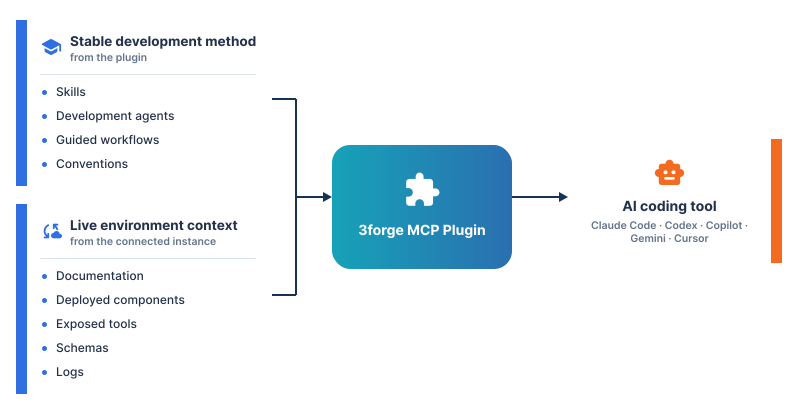
Its knowledge comes from your running instance, not from a snapshot. As the deployment evolves, the assistant evolves with it: nothing hard-coded, nothing to go stale. Every recommendation reflects the system you actually run. The plugin is available for:
- Full support
- Claude Code, Codex, GitHub Copilot
- Adapted versions
- Gemini, Cursor
Expertise from the plugin, context from your deployment
The plugin brings the method
- Application planning
- Query construction
- Layout design
- Implementation review
- Runtime investigation
Your deployment brings the context
- Its documentation
- Its deployed components and tools
- Its schemas
- Its logs
- Its runtime capabilities
Plugin or Agent
Two routes into one governed runtime
The 3forge Agent brings AI to the people using an application. The 3forge Plugin brings it to the people building one. Where the work happens differs; what governs it does not.
| Dimension | 3forge Plugin | 3forge Agent |
|---|---|---|
| Where it runs | In the developer's coding tool of choice | Inside 3forge Web, alongside the application |
| Who it serves | Developers, alongside their code, repositories and review processes | Business users in a live application, and developers in the browser |
| How it connects | Externally, through the governed MCP server | Natively, within the user's authenticated session |
| Which model | The coding tool's own model | The providers and models your institution approves |
| Typical work | Planning, querying, building, reviewing and debugging across the fabric | Questioning live data, building and refining dashboards in conversation |
| Governance | The developer's identity, entitlements and audit trail | The user's identity, entitlements and audit trail |
Ways to use it
Every stage of delivery, from first plan to reviewed change
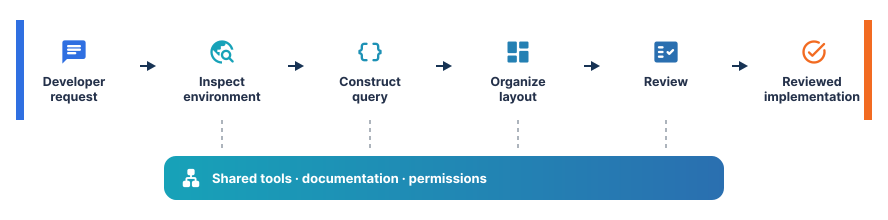
Developers state the objective; the plugin supplies the method, through specialized skills, focused agents and, in Claude Code, dedicated commands. Each session opens with 3forge-init, which grounds the assistant in the project.
Plan with confidence
- Objectives become implementation plans
- Grounded in the components you actually run
- Command:
3forge-plan
Query with precision
- Schemas inspected before a line of SQL is written
- AMI SQL built against live tables, never guessed
- Command:
3forge-query, with the3forge-sql-builderagent
Build to your standards
- Layouts assembled from proven panel patterns
- Configuration that follows your deployment's conventions
- Agents:
3forge-layout-architect,3forge-config-writer
Operate the live instance
- Inspect runtime state and invoke approved operations
- Limited to what the developer's identity permits
- Command:
3forge-runtime, with the3forge-runtimeagent
Review independently
- Every change checked before it lands
- By a dedicated reviewer, not the model that wrote it
- Command:
3forge-review, with the3forge-revieweragent
Diagnose at the source
- Issues traced from configuration and logs to root cause
- On the live deployment, not a description of it
- Command:
3forge-debug
In Codex and GitHub Copilot, the same skills and agents are available through each tool's native prompts. No agent carries authority of its own: each works strictly within the tools, documentation and permissions granted to the developer.
Getting connected
One install, governed from the first call
- Install from the public 3forge marketplace into Claude Code, Codex or GitHub Copilot
View the repository on GitHub (opens in a new tab)
- Connect automatically to your running 3forge Web, or point to any other host
- Discover the entire fabric, from shared documentation and logs to each Center, Relay and Web Server
- Secure by design, over HTTPS with a certificate from a trusted authority in production
Where it matters
Every AI-generated change, under control
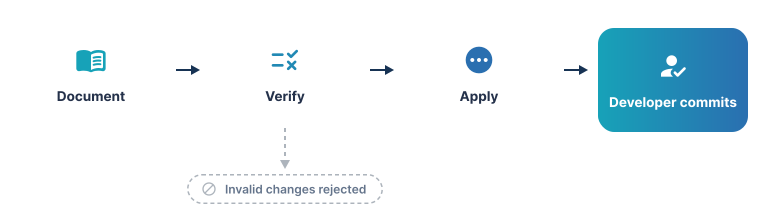
The plugin enforces a disciplined document, verify, apply sequence: consult the documentation, validate the change, and only then apply it. Nothing an assistant builds in a session becomes permanent until someone commits it.
Knowledge that is audited, not assumed
- A structured corpus for AI development, organized by functional domain
- Documentation audited against the live tool surface
- Every correction reviewed and approved by a person before it is published
Keep reading
The tools are governed because the runtime is.
How 3forge contains what AI-built software can reach, and the three ways AI is exposed.